
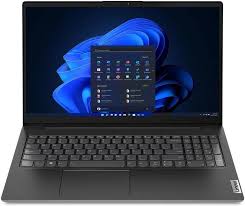
LENOVO V15 G4 Buying Guide for Sri Lanka: Specs, Value, and Practical Advice
The LENOVO V15 G4 is one of the most searched business-style laptops in Sri Lanka because it balances everyday performance, a 15.6-inch display, practical ports, and a price range that often suits students, office teams, freelancers, and small businesses. From my experience helping Sri Lankan buyers compare work laptops, this model usually appeals to people who want a reliable machine without paying for premium features they may not use.
Lenovo’s Sri Lanka product page describes the V15 Gen 4 AMD model as a laptop with AMD processors, integrated AMD graphics, and a 15.6-inch FHD display for multitasking on the go. It also lists options such as Wi-Fi up to Wi-Fi 6, Bluetooth 5.0, a privacy shutter, TPM 2.0, and a numeric keypad, depending on the exact configuration.
Table of Contents
- What is the LENOVO V15 G4?
- Why Sri Lankan buyers search for this laptop
- Key LENOVO V15 G4 specifications
- Performance for students, offices, and remote work
- Display, keyboard, and build quality
- Ports and connectivity for Sri Lanka
- Battery life and charging expectations
- LENOVO V15 G4 variants explained
- Comparison table: LENOVO V15 G4 vs common alternatives
- Buying checklist for Sri Lanka
- People Also Ask
- Expert Q&A
- Final buying advice
What is LENOVO V15 G4?
LENOVO V15 G4 is a 15.6-inch everyday business laptop series designed for office work, studying, browsing, online meetings, accounting, and light multitasking. In Sri Lanka, buyers usually choose it for its practical screen size, numeric keypad, usable performance, and value-focused configuration options.
Why LENOVO V15 G4 Is Popular in Sri Lanka
Sri Lankan laptop buyers often look for a machine that can handle real daily work: Microsoft Office, Google Workspace, Zoom or Teams calls, online classes, email, web browsing, Sinhala and Tamil typing tools, accounting software, and light content editing. Therefore, a laptop does not need to be flashy to be useful. It needs to be dependable.
The LENOVO V15 G4 fits this demand because it is positioned as a practical 15-inch laptop. It is not mainly a gaming device, and it is not a luxury ultrabook. Instead, it is a sensible option for people who want a full-size screen, a keyboard with number pad, decent storage, and business-friendly features.
In Sri Lanka, the buying decision is also shaped by warranty, after-sales support, local stock, power stability, and whether the configuration is suitable for three to five years of use. As a result, the best choice is not always the cheapest LENOVO V15 G4 listing. The better choice is usually the configuration that has enough RAM, SSD storage, and display quality for your workload.
Key LENOVO V15 G4 Specifications to Check
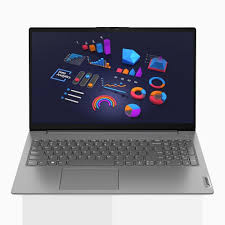
The LENOVO V15 G4 comes in different regional and processor variants. Some models use AMD Ryzen processors, while others use Intel processors. Because stock can vary by seller and import batch, Sri Lankan buyers should always check the exact processor, RAM, storage, display type, and warranty before buying.
According to Lenovo’s official Sri Lanka page for the V15 Gen 4 AMD model, the laptop can include a 15.6-inch Full HD display, integrated AMD graphics, Wi-Fi up to Wi-Fi 6, Bluetooth 5.0, stereo speakers, a webcam privacy shutter, TPM 2.0, and a Kensington security slot. Display options listed include FHD IPS 300-nit and FHD TN 250-nit panels, depending on the model.
For Intel-based LENOVO V15 G4 IRU models, Lenovo’s PSREF document lists battery options such as 38Wh and 45Wh batteries with Rapid Charge support, along with a 720p HD camera with privacy shutter, stereo speakers, Dolby Audio, and dual microphones.
Practical Specification Table
| Feature | What to Look For | Why It Matters in Sri Lanka |
| Processor | AMD Ryzen 3/5/7 or Intel Core i3/i5/i7 variant | Affects speed, multitasking, and long-term usefulness |
| RAM | 8GB minimum, 16GB better | Helps with Chrome tabs, Office, Zoom, and accounting apps |
| Storage | 256GB SSD minimum, 512GB SSD preferred | SSDs make booting and app loading much faster |
| Display | 15.6-inch FHD IPS preferred | Better viewing angles than TN panels |
| Battery | 38Wh or 45Wh depending on model | Useful during power cuts or travel |
| Webcam | 720p with privacy shutter | Important for online classes and meetings |
| Connectivity | USB-A, USB-C, HDMI, RJ45 on many variants | Practical for projectors, printers, and office networks |
| Security | TPM 2.0, privacy shutter, Kensington slot | Useful for businesses and shared workplaces |
LENOVO V15 G4 Performance: Who Is It Best For?
The LENOVO V15 G4 is best for everyday productivity. It is suitable for school assignments, university work, office documents, spreadsheets, browser-based systems, email, video calls, and light business management.
For example, a student in Colombo, Kandy, Galle, Kurunegala, Jaffna, or Matara may use it for online lectures, research, presentations, and typing notes. Similarly, a small business owner may use it for invoices, stock sheets, WhatsApp Web, email, and cloud accounting. In these cases, the laptop’s practical 15.6-inch screen and numeric keypad are more useful than RGB lighting or gaming-focused features.
However, buyers should be realistic. The LENOVO V15 G4 is not the ideal choice for heavy gaming, advanced 3D modelling, professional video editing, or engineering workloads that need a dedicated graphics card. It can handle light editing and basic creative work, but demanding applications will perform better on a higher-end laptop.
Best Use Cases
The LENOVO V15 G4 is a strong fit for:
- School and university assignments
- Office work and administration
- Accounting and invoicing
- Web browsing and online research
- Zoom, Google Meet, and Microsoft Teams
- Email, documents, and spreadsheets
- Small business operations
- Light photo editing and basic design
In contrast, it is not the best choice for:
- AAA gaming
- Heavy Adobe Premiere Pro editing
- Professional 3D rendering
- Large engineering simulations
- AI model training or GPU-heavy workloads
Choosing the Right LENOVO V15 G4 Processor
Processor choice matters because Sri Lankan buyers often keep laptops for several years. A low-spec model may feel affordable today, but it can become frustrating if your workload grows.
A Ryzen 3 or Intel Core i3 version can work well for basic study and office tasks. However, if your budget allows, a Ryzen 5 or Intel Core i5 version is usually a safer middle-ground choice. It gives better multitasking performance and may stay useful for longer.
A Ryzen 7 or Intel Core i7 variant can be helpful for heavier multitasking, but it may not always be necessary. For many Sri Lankan users, more RAM and a better SSD can make a bigger everyday difference than choosing the highest processor.
Simple Processor Advice
If you mainly use Word, Excel, Chrome, Zoom, and email, choose at least Ryzen 3 or Core i3 with 8GB RAM. However, if you keep many tabs open, work with large spreadsheets, or want longer usable life, choose Ryzen 5 or Core i5 with 16GB RAM if available.
RAM and Storage: Do Not Ignore These
Many buyers focus only on the processor, but RAM and storage strongly affect the real experience. In Sri Lanka, people often use several browser tabs, messaging apps, cloud documents, and video calls at the same time. Therefore, 8GB RAM should be treated as the practical minimum.
If you can choose 16GB RAM, it is better for long-term use. It helps the laptop stay smoother when multitasking. It is also useful for students who run research tabs, PDF readers, office apps, and meeting software together.
For storage, an SSD is essential. A 512GB SSD is usually the better choice because Windows, updates, Office apps, downloads, and personal files can quickly fill a 256GB drive. However, if your budget is tight and you mostly use cloud storage, 256GB can still work.
Display Quality: IPS vs TN Matters
The LENOVO V15 G4 may be sold with different display panel types. This is important because two laptops with the same model name can feel different in daily use.
An IPS display usually gives better viewing angles and more comfortable visuals. This matters when you work for long hours, share the screen with another person, or watch lectures. A TN display can still be usable, but colours and viewing angles are usually weaker.
Lenovo’s Sri Lanka page lists both 15.6-inch FHD IPS 300-nit and 15.6-inch FHD TN 250-nit display options for the V15 Gen 4 AMD series, so buyers should confirm the exact panel before purchase.
Display Buying Tip
For Sri Lanka, choose the Full HD IPS version whenever possible. It is usually more comfortable for office work, online classes, and reading. If a seller lists only “FHD display” without saying IPS or TN, ask before paying.
Keyboard, Numeric Keypad, and Build
A full-size keyboard is one of the main reasons people choose a 15.6-inch laptop. The LENOVO V15 G4 includes a numeric keypad on many configurations, which is very useful for accounting, data entry, billing, Excel sheets, and admin work.
From my experience, Sri Lankan office users often prefer this layout because they work with numbers daily. A smaller 14-inch laptop may be easier to carry, but it usually does not offer the same comfortable number pad experience.
The build is practical rather than premium. That means buyers should not expect aluminium ultrabook quality. Still, for careful daily use at home, school, university, or office, the design is suitable.
Ports and Connectivity for Local Use
Ports matter in Sri Lanka because many offices, schools, tuition centres, and small businesses still use projectors, USB printers, wired networks, external keyboards, and HDMI monitors. A laptop with practical ports reduces the need for extra adapters.
Lenovo lists ports such as USB-A, USB-C, HDMI, Ethernet RJ45, headphone/mic combo, and Kensington security slot on V15 Gen 4 AMD variants, although the exact layout depends on the processor series and configuration.
This is helpful for users who connect to office networks or use external displays. For example, HDMI is useful for presentations, while Ethernet is useful in workplaces where Wi-Fi is unstable.
Battery Life and Charging Expectations
Battery life depends on the exact battery size, processor, brightness, Wi-Fi use, and workload. Therefore, buyers should avoid expecting the same runtime in every situation.
Lenovo’s PSREF for the Intel V15 G4 IRU lists 38Wh and 45Wh battery options with Rapid Charge support. It also reports approximate maximum battery life figures based on benchmark conditions, including local video playback and MobileMark testing.
In real Sri Lankan use, battery life can be lower than benchmark claims, especially when using Chrome, video calls, high brightness, mobile hotspot, or multiple apps. However, Rapid Charge support is valuable if you move between home, office, university, and client visits.
Battery Advice for Sri Lanka
During power interruptions, the LENOVO V15 G4 can help you continue basic work for a while, but it should not be treated like an all-day battery laptop. If power backup is a major concern, consider pairing it with a UPS for home routers and keeping brightness moderate.
LENOVO V15 G4 Variants Explained
The model name can be confusing because “LENOVO V15 G4” may refer to several versions. For example, you may see labels such as V15 G4 AMN, V15 G4 ABP, or V15 G4 IRU. These letters usually indicate platform or processor family.
This is why two sellers may advertise the same laptop name at different prices. One may offer Ryzen 3 with 8GB RAM and 256GB SSD, while another may offer Ryzen 5 or Ryzen 7 with 512GB SSD. In addition, one may have an IPS display while another may have a TN display.
Therefore, always compare full specifications, not just the model name.
What to Ask the Seller
Before buying, ask:
- What is the exact processor model?
- Is the display IPS or TN?
- How much RAM is installed?
- Is the RAM upgradeable?
- What is the SSD capacity?
- Is the warranty local, international, or seller warranty?
- Is Windows genuine and activated?
- What accessories are included?
- Is the laptop brand new, open-box, or refurbished?
- What is the return or replacement policy?
Comparison Table: LENOVO V15 G4 vs Typical Buyer Options
| Buyer Option | Strengths | Weaknesses | Best For |
| LENOVO V15 G4 | Practical ports, 15.6-inch screen, numeric keypad, good value | Not for heavy gaming or premium build seekers | Students, offices, small businesses |
| Budget 14-inch laptop | Easier to carry, often lightweight | Smaller screen, usually no number pad | Students who travel daily |
| Gaming laptop | Dedicated graphics, stronger cooling | Heavier, shorter battery, higher price | Gaming, design, video editing |
| Premium ultrabook | Better build, lighter, better battery | More expensive, fewer ports | Executives and frequent travellers |
| Refurbished business laptop | Strong build for price | Battery wear and warranty risk | Budget buyers who know what to inspect |
For most Sri Lankan office and study needs, the LENOVO V15 G4 sits in a sensible middle position. It is more practical than many ultra-budget laptops but more affordable than premium models.
Numbered Buying Checklist for Sri Lanka
Use this checklist before purchasing a LENOVO V15 G4:
- Confirm the exact model code and processor generation.
- Choose at least 8GB RAM; select 16GB if your budget allows.
- Prefer a 512GB SSD for long-term storage comfort.
- Ask whether the display is IPS or TN.
- Check that the keyboard layout suits your typing needs.
- Confirm warranty type and duration in writing.
- Ask whether Windows is genuine and activated.
- Inspect the charger, box, serial number, and invoice.
- Compare the same configuration across sellers, not just the name.
- Buy from a seller who provides clear after-sales support.
Price and Value Considerations in Sri Lanka
Laptop prices in Sri Lanka can change due to exchange rates, import costs, stock availability, taxes, and warranty type. Therefore, it is better to compare current offers rather than rely on an old price range.
A low price can be attractive, but it may come with compromises. For example, the cheaper model may have less RAM, a smaller SSD, a TN display, or limited warranty. On the other hand, a slightly higher-priced model may give better long-term value.
As a practical rule, compare the total package. Look at performance, RAM, SSD, display, warranty, and seller support. A laptop used daily for study or business should be judged by reliability, not only the lowest price.
Is LENOVO V15 G4 Good for Students?
Yes, the LENOVO V15 G4 can be a good student laptop in Sri Lanka. It has a large enough screen for reading PDFs, joining online classes, preparing assignments, and watching recorded lectures. Also, the keyboard is useful for longer typing sessions.
However, students who carry a laptop every day may prefer a lighter 14-inch model. The V15 G4 is still portable, but a 15.6-inch laptop naturally takes more bag space. Therefore, students should balance screen comfort with portability.
For IT, business, management, arts, commerce, and general degree programmes, it is usually suitable. For architecture, engineering graphics, high-end coding environments, or media production, choose a stronger configuration or a laptop with dedicated graphics.
Is LENOVO V15 G4 Good for Office Work?
Yes. The LENOVO V15 G4 is especially suitable for office work because it focuses on everyday productivity. The numeric keypad helps with spreadsheets and accounting. The HDMI port helps with presentations. The webcam privacy shutter is useful for professional calls.
Small businesses in Sri Lanka can use it for billing systems, inventory sheets, POS support tasks, email, cloud software, and document management. However, companies should standardise configurations if buying multiple units. This makes maintenance easier.
For office teams, I would usually prioritise 8GB or 16GB RAM, 512GB SSD, and a reliable warranty. Also, a laptop bag, surge protector, and external mouse are useful additions.
Software and Security Features
The LENOVO V15 G4 supports practical security features such as TPM 2.0 on listed configurations. TPM 2.0 helps support modern Windows security requirements, including device encryption and secure credential handling.
The privacy shutter is also useful. In shared homes, hostels, classrooms, and offices, a physical camera cover gives extra peace of mind. It is a simple feature, but many users appreciate it after they start attending frequent online meetings.
Lenovo also lists Lenovo Vantage as included software on the Sri Lanka product page. This can help users manage updates, device settings, and system information.
For operating system guidance, Microsoft’s official Windows information is useful when checking compatibility and security expectations. You can review Microsoft Windows official guidance before selecting a Windows laptop
